Original Images And Clear Direction
The original listing photographs and clear editing instructions.
Turn ordinary listing photography into clean, consistent marketing imagery while preserving the property's real features.
The original listing photographs and clear editing instructions.
Corrected, presentation-ready images for approved marketing channels.
The professional confirms that edits remain truthful and comply with MLS, brokerage, and advertising rules.
Even a carefully photographed home can emerge from the camera with mixed color temperatures, leaning vertical lines, uneven exposure, muted exterior color, lens distortion, or major visual differences from one room to the next.
AI-assisted photo editing can correct those photographic problems across an entire listing while preserving the home's real architecture, materials, condition, and surroundings. The objective is not to manufacture a better property. It is to produce a clearer, more consistent representation of the property that was actually photographed.
That distinction matters. A camera may render a white wall yellow under an incandescent lamp or make a bright room appear dark because it exposed for the windows. Correcting the photograph can help it reflect what a person experienced in the room. Changing the wall finish, removing a permanent defect, widening the room, or replacing the view changes the represented property and requires a different level of judgment, disclosure, or prohibition.
A useful workflow therefore combines AI speed with visible professional authority. The AI proposes bounded corrections. The agent, photographer, brokerage, or other responsible professional decides what accurately represents the property and what is appropriate for each marketing channel.
A professional listing set usually needs more than one global filter. Each correction solves a different photographic problem, and the final images need to work together as one visual tour.
Balance bright and dark areas so room features remain visible without creating artificial light sources. Careful recovery protects window areas, reflective surfaces, and the natural direction of light.
Reduce unwanted yellow, blue, green, or magenta casts caused by mixed daylight and interior fixtures. Review remains important wherever paint, cabinetry, flooring, or other finishes affect a buyer's understanding.
Correct leaning verticals, barrel distortion, and minor camera tilt so walls and exterior elevations appear structurally natural. The correction should restore normal geometry, not stretch a room or exaggerate its size.
Refine the frame, level horizontal references, and remove unhelpful edge space while retaining context buyers need. Consistent composition gives the listing gallery a more deliberate rhythm.
Reduce low-light noise and apply restrained sharpening for clearer presentation at normal viewing sizes. The goal is readable detail, not synthetic texture or invented features.
Evaluate brightness, color, crop, contrast, and export treatment across the complete image sequence. This prevents one room from feeling warm and inviting while the next appears dim, cold, or processed in a different style.
Create approved file sizes, formats, and compression levels for MLS, websites, portals, social campaigns, presentations, and print. Channel-specific copies can be produced without repeatedly editing the master image.
Flag photographs whose blur, reflections, extreme exposure, missing detail, or unusual color make automated correction uncertain. A weak source image should be escalated for review rather than silently overprocessed.
The final decision belongs to the responsible real-estate professional. Local MLS, brokerage, advertising, and disclosure requirements control what may be published and how modified imagery must be identified.
Examples can include exposure, white balance, vertical alignment, lens distortion, crop, noise, moderate contrast, restrained sharpening, and consistency across the listing set.
The reviewer still confirms that colors, materials, proportions, light, and visible surroundings remain faithful to the property.
Object removal, sky replacement, virtual staging, lawn enhancement, twilight conversion, view changes, or adding environmental conditions go beyond ordinary photographic correction.
Those capabilities should use their own rules, review process, original-image retention, and any disclosure required by the applicable marketing channel.
The editing workflow should not quietly hide permanent defects, change finishes, widen rooms, replace architectural elements, fabricate amenities, or create a materially different surrounding view.
When an instruction could alter a buyer's understanding of the property, the system should stop and route the image to professional judgment.
The capability becomes valuable when it fits the complete production path—not when it merely changes one image.
Upload the approved camera files or exported photographs together so the AI can understand the visual relationship between rooms, exteriors, details, and the intended gallery sequence.
Specify the desired brightness, color, crop, perspective, output channels, brokerage style, and property-truth boundaries. Identify any photograph or material that needs special handling.
Apply bounded corrections to individual files, then compare the entire sequence for consistency. Uncertain source images or requested changes are flagged instead of silently forced through the workflow.
The responsible professional examines before-and-after versions, checks significant colors and property features, reviews flagged exceptions, and approves or rejects each proposed result.
Produce the required file versions and naming structure for MLS, websites, portals, social media, presentations, or print while retaining the original source and approved master.
Each example begins with a real photographic limitation, identifies the bounded corrections, and ends with the professional review that protects the property's real features.
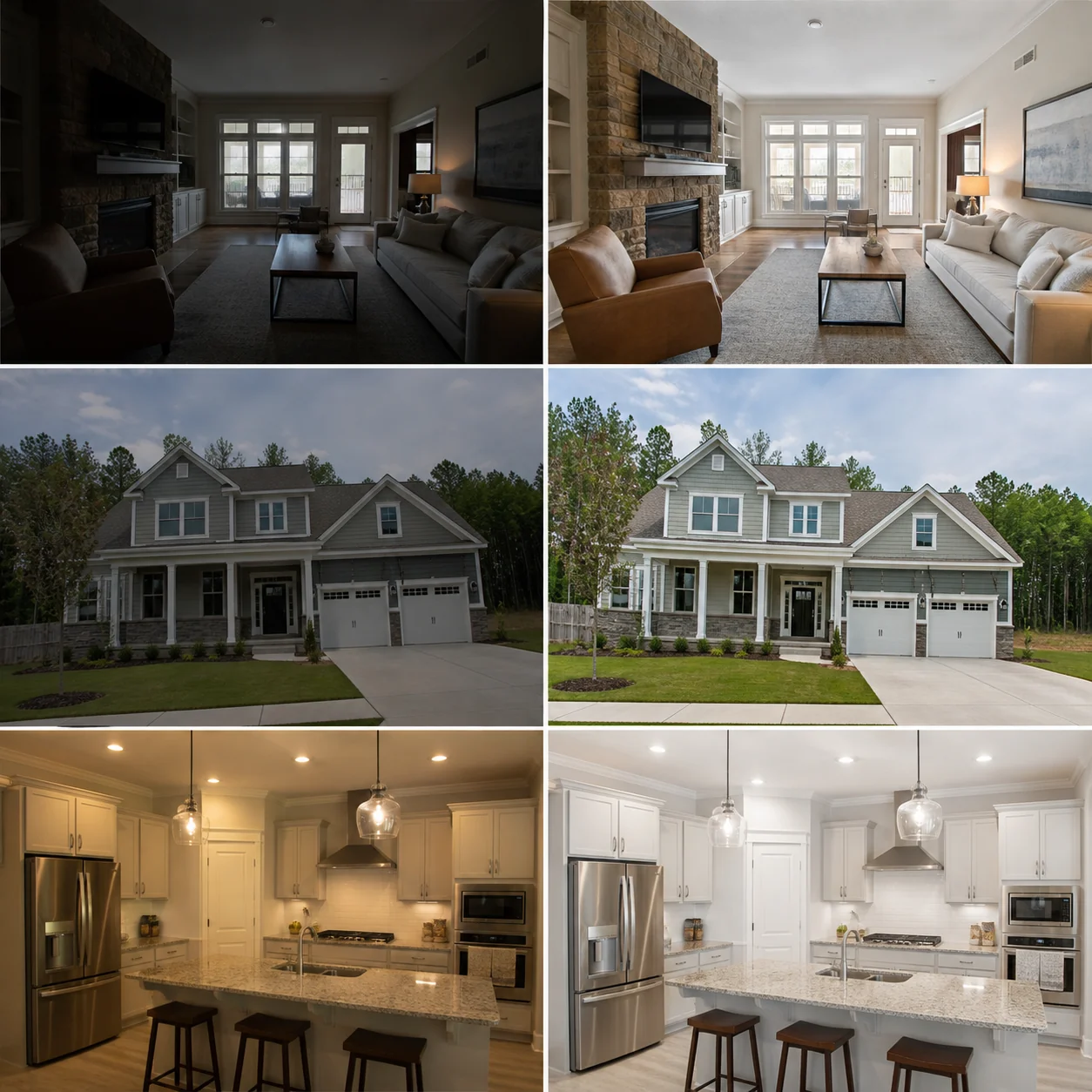
A living room was photographed on a bright afternoon. The camera protected the windows, leaving the seating area underexposed, the neutral wall color muddy, and useful shadow detail difficult to see. Mixed daylight and lamp light also created competing color temperatures.
AI-assisted correction opens the shadows, balances the mixed light, controls the brightest window areas, and restores natural contrast without replacing the view or inventing room details. The professional compares the result with the original files and the actual property, paying particular attention to wall color, flooring, finishes, and the appearance through the windows.
A handheld front-elevation photograph shows mild lens distortion, leaning vertical lines, a slightly tilted composition, and subdued contrast from overcast conditions. The home is clearly documented, but the photograph feels casual rather than listing-ready.
The edited version levels the architecture, corrects perspective and lens distortion, refines the crop, and restores restrained color and contrast. The building, landscaping, driveway, roofline, and neighboring context remain unchanged so the finished image looks professionally prepared without portraying a different property.
A listing set combines rooms photographed at different times of day, with different lenses, and under daylight, incandescent, and LED lighting. Individual photographs may be usable, but their brightness, white balance, crop, and color treatment change noticeably as a buyer moves through the gallery.
The AI evaluates the photographs as one coordinated collection and proposes consistent brightness, neutral color, perspective, crop, and export treatment. The professional reviews the sequence as a complete buyer experience, checks rooms with distinctive materials individually, and approves a cohesive set rather than a collection of unrelated edits.
The useful question is not merely whether AI can change an image. It is whether the complete workflow can produce consistent, reviewable marketing assets while protecting property truth.
No. Photo editing corrects photographic qualities such as exposure, color, perspective, crop, noise, and consistency. Virtual staging adds furnishings or decor to demonstrate a possible use of a room. Staged versions should follow their own review, original-image retention, and disclosure process.
Yes, and set-level consistency is one of the capability's most useful applications. The AI can compare brightness, color, contrast, crop, perspective, and export treatment across the full gallery. A person should still review distinctive materials, unusual lighting, and important property details individually.
It can correct many phone-photo problems when the source contains enough usable detail. Exposure, color, perspective, noise, and crop may improve substantially, but AI cannot reliably recover information that was never captured. Severe blur, blocked shadows, clipped highlights, poor focus, or an obstructed composition may require a reshoot.
A governed workflow should retain the originals and create edited versions rather than destructively replacing source files. Originals support before-and-after review, correction of an overprocessed result, future exports, and any recordkeeping required by the professional or brokerage.
Object removal is a separate capability because it changes what appeared in the photographed scene. Small temporary distractions and meaningful property conditions should not be treated as the same thing. The request needs explicit professional review, and applicable MLS, brokerage, advertising, and disclosure rules should determine whether and how the result is used.
Compare the edited version directly with the original, then check architecture, room proportions, windows, views, permanent fixtures, paint, cabinets, counters, flooring, landscaping, and visible property condition. The reviewer should also examine the listing as a complete sequence and reject any image that looks synthetic, inconsistent, or materially misleading.
Yes. After a master image is approved, the workflow can create channel-specific dimensions, formats, compression levels, and file names for MLS, websites, listing portals, social media, presentations, email, and print. The approved master remains the common source for those exports.
Provide the complete listing set, identify the intended channels, describe the desired visual style, and state what the AI must preserve. Include any brokerage standards, known color references, output requirements, and examples of approved prior work. Clear boundaries are as important as clear creative direction.
Yes. A brokerage or photography team can define rules for brightness, white balance, perspective, crop, contrast, sharpening, exceptions, review, file naming, and output. The standard creates a consistent starting point, while human reviewers retain authority over unusual properties and consequential edits.
Tell SynHy you want access to AI Real Estate Photo Editing. We will confirm the operating requirements, human-review boundaries, source material, and the simplest useful way to activate the capability.
The value is not the number of seconds required to change one photograph. Measure recovered production time, routine expense avoided, additional listing capacity, and the operational value of a consistent seller and buyer presentation. The scenarios below are calculation methods, not guaranteed outcomes.